🚀 UPCOMING WEBINAR: See Payroll in Care Control Cloud in action on Thursday 18th June and discover how to manage payroll more efficiently from one connected system. Click here to find out more!

View Categories

Timesheets

This guide will cover how to access and amend staff timesheets on Care Control Windows. Here, working hours can be amended in order to correct payroll reports.

1

In the Administration of Care Control Windows, navigate to the Timesheets tool, which can be found under the Time & Attendance tab.

2

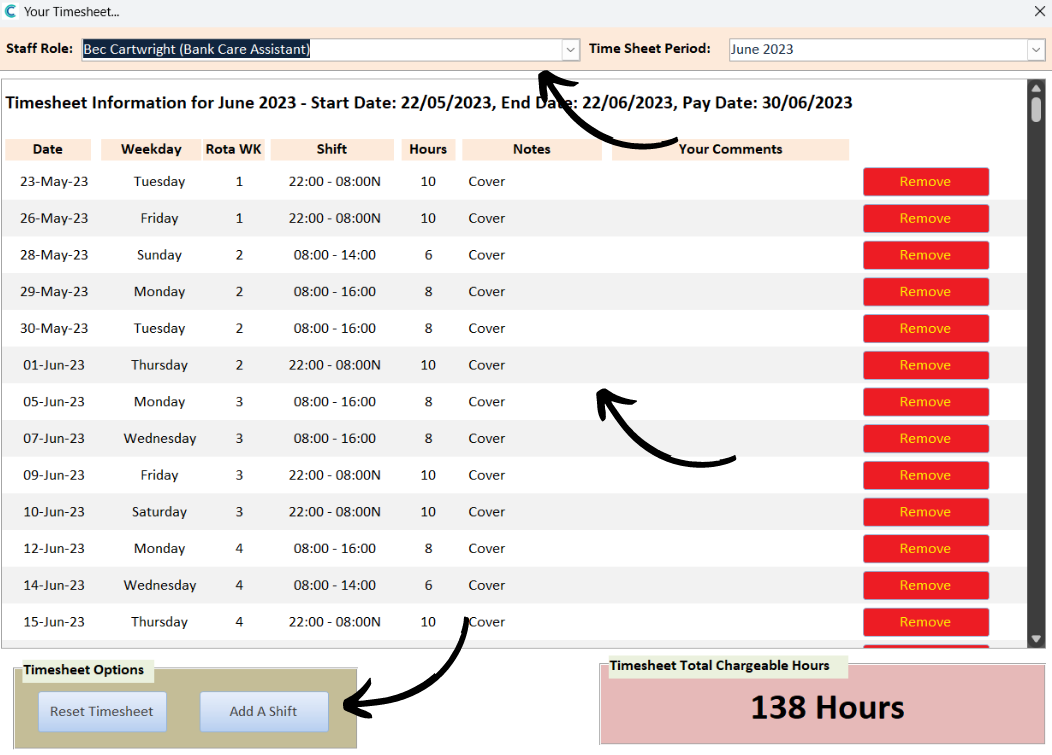
A new window will open, here select a staff member from the drop-down list and select a timesheet period.

Shifts recorded will load and these can be removed via the dedicated button on the right-hand side. Shifts can also be added using the button at the bottom of the window.

The Total Chargeable Hours will display in the bottom right of the window and will account for additions or deductions made here.

3

When adding a shift, a new window will open. Here, enter the date, shift hours and any other additional comments. Press Add to complete the process.