🚀 UPCOMING WEBINAR: See Payroll in Care Control Cloud in action on Thursday 18th June and discover how to manage payroll more efficiently from one connected system. Click here to find out more!

View Categories

Removing Staff Training

This guide will cover how to remove staff training courses from Care Control. This includes deactivating courses from your system entirely as well as removing a course from being mandatory.

1

In the Administration of Care Control Windows, navigate to the Training Records tool, which can be found under the Staff Area tab.

2

A new window will open, here select Set Mandatory Courses.

3

A list of mandatory courses will be displayed. To remove one, simply select it and press Remove Record. This will not remove the course from your system, but instead the course will no longer be mandatory for new or existing staff members.

4

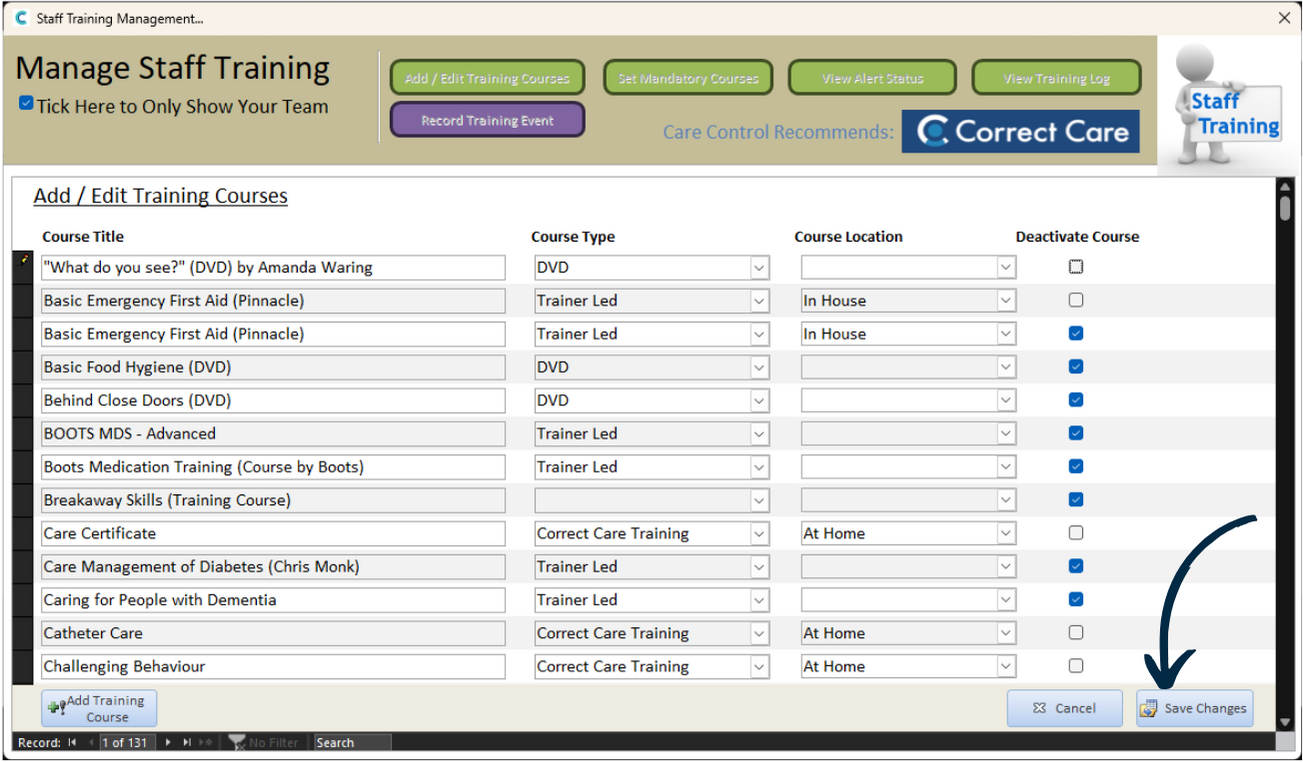
To deactivate a course entirely, select Add / Edit Training Courses from the options at the top of the window. 

Here, a list of all the courses on your system will be displayed. Simply tick the Deactivate Course box next to the course to deactivate it.
5

Make sure to press Save Changes after making any amendments.