View Categories

How to Set Up Care Control V-Book

Learn how to generate a One-Time Code in Care Control Cloud and use it to register your device for Care Control V-Book.

Takes 5 minutes
For: Admin and IT
Updated: 16th November 2026

Introduction

Care Control V-Book requires a One-Time Code to register your device before you can start using the application.

An administrator can generate a One-Time Code through Care Control Cloud and send it to the staff member responsible for registering the device.

Once you have received your code, you can enter it into V-Book, provide a recognisable device name and complete the registration process.

In this guide, you'll learn how to:

  • Access One Time Codes in Care Control Cloud.
  • Set an expiry date and time for your code.
  • Select the staff member who should receive the code.
  • Generate and send a One-Time Code.
  • Enter the code into Care Control V-Book.
  • Name your device and complete registration.

Open One Time Codes in Care Control Cloud

In Care Control Cloud, navigate to HR and open the Advanced section.

Select One Time Codes to begin generating a code for device registration.
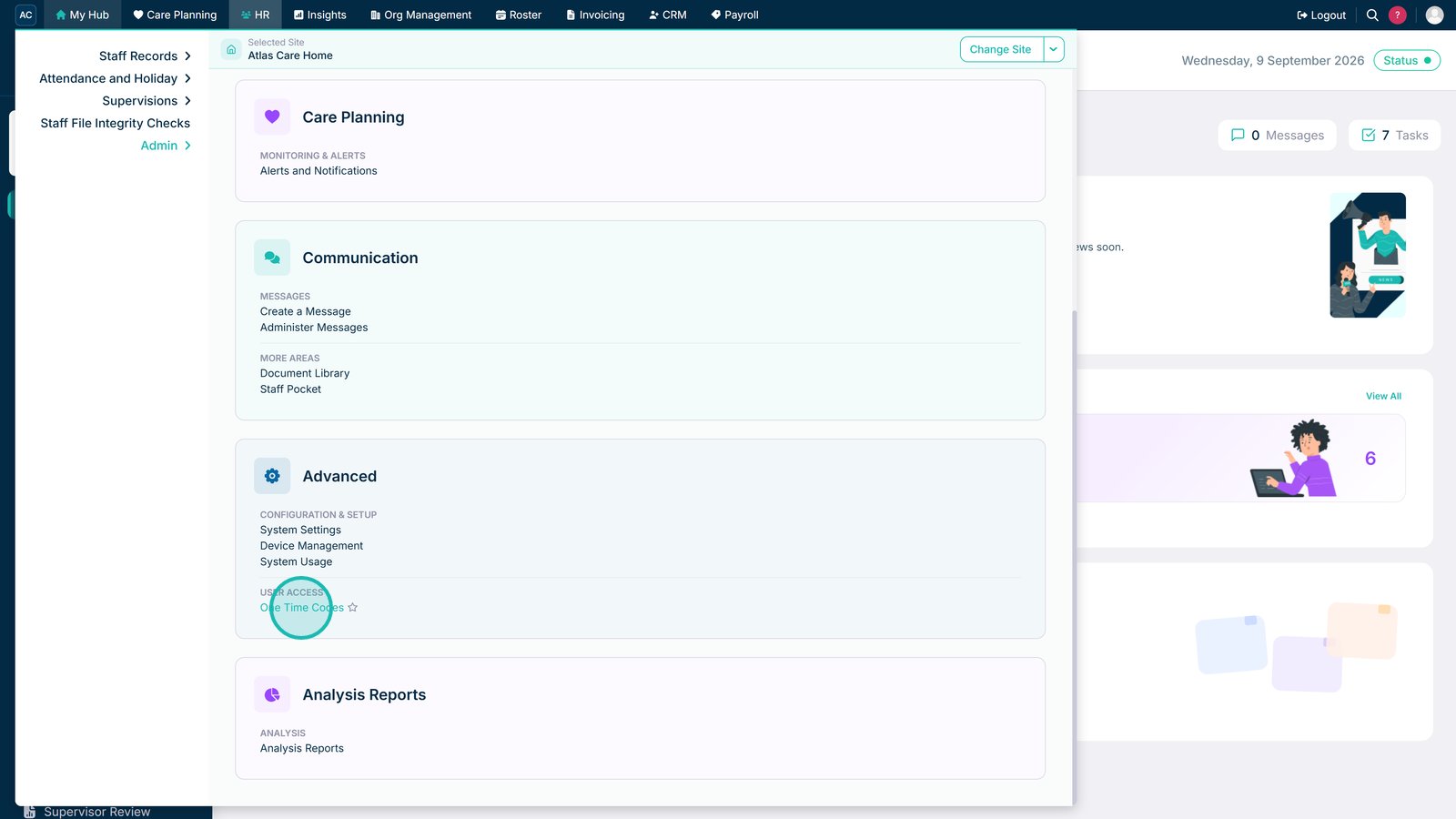
Open One Time Codes in Care Control Cloud

Set the Code Expiry Date and Time

Choose an expiry date for the One-Time Code.

Select an expiry date for the One-Time Code

Next, select the expiry time. Make sure the code will remain valid until the device registration has been completed.

Select an expiry time for the One-Time Code

Select the Staff Member

Find and select the staff member who needs to receive the One-Time Code.

Select a staff member to receive the One-Time Code

Add the Selected Staff Member

Add the selected staff member to the list of recipients for the One-Time Code.

Add the selected staff member to the One-Time Code recipients

Generate and Send the One-Time Code

Once you've selected the recipient and configured the expiry settings, generate and send the One-Time Code.

The staff member can now use this code to register their V-Book device.

Generate and send the One-Time Code

Enter Your One-Time Code in V-Book

Open Care Control V-Book on the device you want to register.

Enter the One-Time Code generated in Care Control Cloud into the field provided.

Enter the One-Time Code into Care Control V-Book

Enter a Device Name

Enter a device name that will help you easily identify the device in future.

Choose a recognisable name, such as the device's location or purpose.

Enter a recognisable device name in Care Control V-Book

Complete Device Registration

Once you've entered your One-Time Code and device name, select Next to complete the V-Book setup process.

Your device registration is now complete.

Select Next to complete Care Control V-Book device registration

Top tip

Make sure your One-Time Code has not expired before registering your device. Give your device a recognisable name so you can easily identify it later.

Was this guide helpful?

Need more help?

Can't find what you're looking for? Our support team is here to help.

Contact Support

Or call us on

On this page