
VBook. Now its own app.
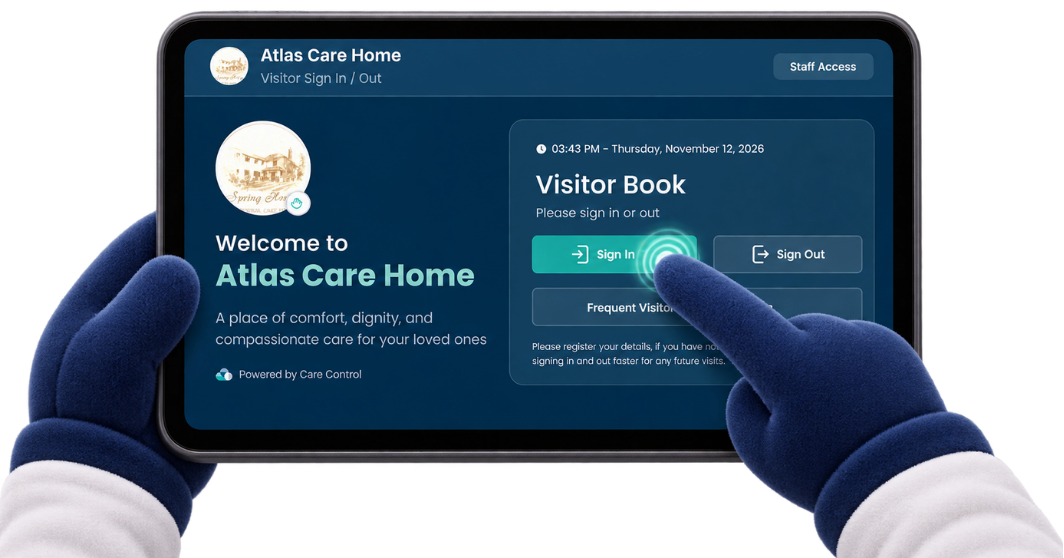
The visitor book you already know from Care Control Mobile, now in a dedicated tablet app. Enjoy a faster, smoother and simpler way to manage visitors, with the Care Control Cloud integration you rely on.
Where would you like to start?
Whether you're ready to try the standalone app or want to see how it works first, we've brought the essentials together.
Try it for free
Explore the dedicated VBook app with a 30-day free trial arranged by our Support Team.
View trial detailsDownload VBook
Find the standalone VBook app on Google Play for your Android tablet.
Get the appGet set up
See the simple route from requesting a trial to using VBook at your service.
Getting startedBrowse the guides
Find step-by-step help for setup, visitor journeys and the app's key features.
LearningHub guidesGet the standalone VBook app
Care Control VBook is available on Google Play for Android tablets. Download the app to your service's device, then use our guides to get everything set up.
Want to try it first? Downloading the app doesn't start your free trial. Contact the Care Control Support Team to arrange your 30-day trial.
Available on Google Play
Care Control VBookA dedicated visitor book experience for Android tablets, with your visitor information connected to Care Control Cloud.
The VBook you know, built for one job
VBook has been part of Care Control Mobile for some time, helping services manage visitors without a paper sign-in book.
The new standalone app gives that same important job its own dedicated home. Designed for a shared reception tablet, it focuses on making the everyday visitor experience faster, clearer and more efficient.
It's a dedicated app, not a completely new visitor book. VBook remains connected to Care Control, so your team can manage and review visitor information in Cloud.
Faster everyday use
A focused experience for signing people in and out without navigating the wider Mobile app.
Made for tablets
A dedicated, visitor-friendly interface designed for a shared device at your service.
Connected to Cloud
Visitor activity and records work alongside your wider Care Control system.
Built with safety in mind
Visitor visibility and fire roll call tools support your team's evacuation process.
Everything you need to manage visitors
Straightforward sign-in for visitors, useful oversight for staff and the flexibility to support different care services.
Simple sign-in and sign-out
Help friends, family, professionals and other visitors record their arrival and departure through a clear digital journey.
Frequent visitors
Make repeat visits easier with registration and identification options for people who regularly visit your service.
Cloud visitor records
View who's signed in, see visitor history and manage visitor records through Care Control Cloud.
Evacuation roll calls
Access visitor presence information and record who is accounted for, outside or not yet accounted for during a roll call.
Configurable for your service
Manage visitor types, sign-in or sign-out statements and selected appearance settings from Cloud.
Optional visitor feedback
Where configured, visitors can be invited to complete a Quality Survey after signing out.
From hello to goodbye, made simple
Visitors can complete the main steps on the tablet, helping your team maintain a clearer view of who is at your service.
Arrive and select sign-in
The visitor opens the simple sign-in journey on your reception tablet.
Identify the visitor
Frequent visitors use their details, while other visitors complete the relevant sign-in process.
Confirm the visit
Once confirmed, the visit is recorded and staff can see who is signed in.
Sign out when leaving
The visitor confirms sign-out, keeping your current visitor list up to date.
Know who is on site
A reliable visitor register matters day to day, and it becomes especially useful when your team needs to account for people during an evacuation.
VBook helps authorised staff review current visitor status and complete fire roll calls, alongside the visitor information available in Care Control Cloud.
Learn more in the VBook guidesUseful information in one place
Get started with the standalone VBook
Our Support Team can arrange your trial and help you understand what's needed before your visitors start using the app.
Contact Support
Ask our Support Team to arrange a 30-day free trial for your service.
Download VBook
Install the standalone app from Google Play on your Android tablet.
Register and configure
Follow the guided setup for your device and adjust your VBook settings as needed.
Start welcoming visitors
Put the tablet in place and begin using VBook's digital sign-in and sign-out.
Try the improved VBook experience
Want to see how the new standalone app works at your service? Contact our Support Team to arrange a free trial, then explore the faster visitor experience on your own device.
Your free trial must be arranged with Support. Please contact the team for subscription conditions, VAT treatment and supported device information.
Everything you need to get going
We've brought the new VBook guidance together in one place. Find help for initial setup, managing visitors and using the app's staff features.
Setting up the app
Get help installing, registering and preparing the standalone VBook for your service.
Browse setup guidanceManaging visitor journeys
Explore sign-in, sign-out, frequent visitor registration and everyday visitor management.
Browse visitor guidanceStaff tools and Cloud
Learn about visitor status, Cloud options, evacuation support and related settings.
Browse staff guidanceVBook FAQs
Answers to a few common questions about the new standalone application, trials, pricing and getting started.
Is VBook a completely new feature?
No. You may already know VBook from Care Control Mobile. The new version is a standalone app designed to make the visitor experience faster, smoother and more focused.
Why use a standalone app?
It gives visitor management its own dedicated tablet experience, rather than requiring you to work within the wider Care Control Mobile app. The aim is to make everyday sign-in and sign-out simpler and more efficient.
Does VBook still work with Care Control Cloud?
Yes. VBook is designed to work with Care Control, allowing authorised staff to access visitor records, see who is currently signed in and review visitor activity through Cloud.
Can we use VBook for fire evacuation roll calls?
Yes. VBook includes visitor status and fire roll call features to support your team's evacuation process. It should be used alongside your service's established emergency procedures.
Where can we download VBook?
You can download the standalone VBook app from Google Play for Android tablets. Contact Support separately if you'd like to activate a 30-day free trial.
How do we start the 30-day free trial?
Simply contact the Care Control Support Team and ask to arrange your trial. The team can advise on activation and getting your device ready.
How much is VBook after the trial?
The standalone VBook subscription is £15 per device, per month, on a 12-month term. Our Support Team can confirm the full subscription terms and any applicable VAT.
Do we need a dedicated tablet?
The standalone VBook is designed for use on a tablet at your service. Contact Support to confirm which devices are supported and the best setup for your organisation.
Where can we find help using the app?
Our VBook LearningHub guide collection covers setup and the main features. If you need additional help, the Support Team is available to assist.
Ready to try the new VBook?
Speak to our Support Team about a 30-day free trial, then follow the LearningHub guides to get your tablet ready for visitors.