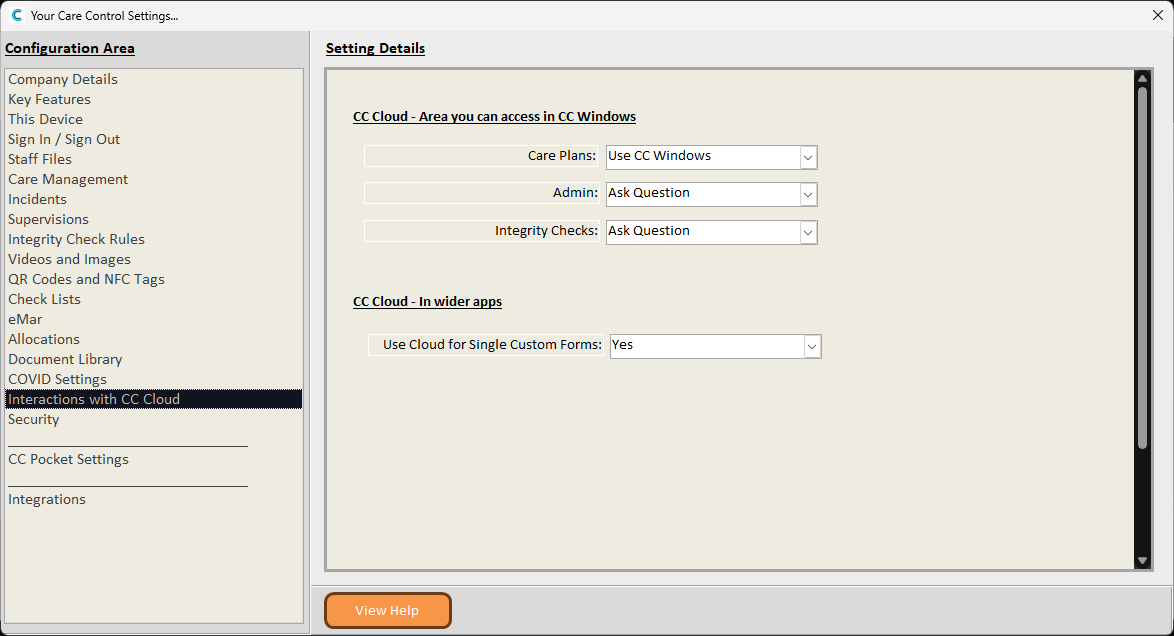
This guide will cover how to toggle SCF access via Cloud, through the Pocket and Mobile applications. When enabled, users will be able to load single custom form drafts in Pocket and Mobile.
1
In the Administration of Care Control Windows, navigate to the System Settings which can be found under the Advanced Stuff tab.
2
Here, select ‘Interactions with CC Cloud‘ from the options on the left hand side. You can then toggle ‘Use Cloud for SCF‘ to Yes or No.
When enabled, opening Single Custom Forms in Pocket and Mobile will launch the Cloud version within each app. This therefore requires a Cloud user account to do this.
For more information, see the following guides for Mobile and Pocket.