Ready to use Payroll? It's now in Cloud!
The feature you have been waiting for
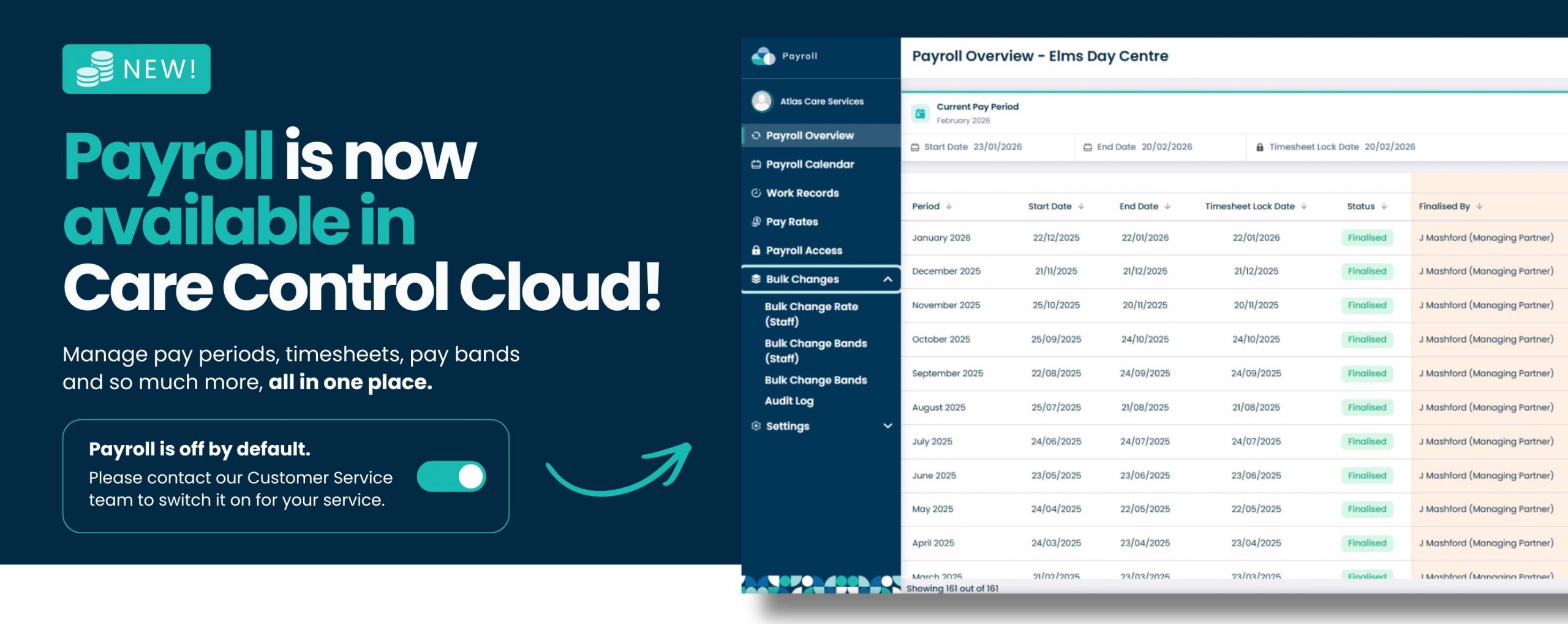
Payroll is now available in Care Control Cloud.
For many providers, payroll has been a key part of their day to day operations, and for those using Care Control Windows, it may have been the deciding factor in delaying a move to cloud. Now, payroll has been brought into the Care Control platform, giving you access to a more intuitive, flexible, and user friendly way to manage payroll.
For providers already using Care Control cloud, Payroll introduces a powerful new capability, helping you bring even more of your processes into one connected system.
This is not just payroll in cloud. It is a more refined experience, designed to give you greater control, clearer visibility, and a simpler way to manage payroll for your service.
What’s new in Cloud Payroll
Pay-bands
- Pay bands allow providers to group employees into structured pay ranges based on their role, experience, or level of responsibility. Rather than managing individual pay rates for every member of staff, pay bands create a consistent and transparent framework that makes payroll easier to manage. For care providers, this means simpler administration, greater control over staffing costs, and the ability to implement pay increases quickly and accurately across groups of employees. Pay bands can also support staff retention and career progression by clearly showing pathways for development and higher earnings. While entirely optional, they provide a flexible way to maintain fair and organised pay structures as your organisation grows.
Bulk changes
- The Bulk Changes feature helps managers and payroll administrators make payroll updates quickly and efficiently across multiple employees or pay bands. Rather than updating records individually, changes can be applied in bulk, saving valuable administration time and reducing the risk of manual errors. Whether updating staff pay rates, moving employees into different pay bands, or adjusting the rates within existing pay bands, Bulk Changes provides a faster and more consistent way to manage payroll updates across the organisation.
Historic Pay Period Data
- The ability to view historic pay periods gives managers and payroll administrators instant access to previous payroll records whenever they need them. Whether investigating a payroll query, reviewing past payments, preparing for an audit, or checking compliance records, historical data is readily available without having to search through archived reports. With the option to export payroll information and view any outstanding issues, providers can resolve discrepancies more quickly, maintain accurate records, and gain greater visibility over their payroll processes. This helps save time, improves accuracy, and provides a clear audit trail for greater confidence in payroll management.
These latest enhancements are just a glimpse of what’s available within Cloud Payroll. Designed to simplify payroll management for care providers, the system combines powerful functionality with an intuitive, easy to navigate experience. From managing pay rates and pay bands to reviewing historical payroll data and resolving issues efficiently, every feature has been built to save time, improve accuracy, and reduce administrative burden. With even more tools and capabilities to explore, Cloud Payroll provides a modern, flexible solution that helps organisations stay in control of their payroll processes with confidence.
Familiar Payroll, made better
If you are currently using payroll in Care Control Windows, this will feel familiar, but significantly improved.
Payroll in Cloud brings across the functionality you rely on, while making payroll quicker and easier to set up, with improved usability and new features that are not available in Windows. From automated payroll calendar creation to better visibility of changes and audit trails, every part of the experience has been designed to be easier to use and more transparent.
You also have greater control, with core settings that allow you to configure payroll around the specific needs of your service.
Move at your own pace
You can run payroll in Care Control Cloud alongside your existing Windows system, giving you the flexibility to transition gradually and with confidence. This allows you to test your processes, ensure everything works as expected, and move across without disrupting your payroll.
A new way to manage Payroll in Cloud
For providers already using Care Control Cloud, Payroll introduces a completely new capability within the system you already use every day.
Instead of relying on separate platforms, you can now manage payroll alongside your care planning, staffing, and operational processes. This creates a more connected way of working, reduces duplication, and gives you a clearer view of your data in one place.
With intuitive workflows, configurable settings, and full visibility of changes through audit trails, Payroll in cloud gives you the tools to manage payroll with greater clarity and control.
Included as part of your system
Payroll is included within Care Control Cloud, meaning there is no additional cost to start using it.
For providers currently using spreadsheets or external payroll systems, this gives you the opportunity to bring payroll into one system without adding extra monthly costs. Instead, you can manage payroll within Care Control while gaining better visibility of your data, including a clear view of gross and net pay across your service.
More control, more visibility, one system.
Payroll in Care Control Cloud is designed to simplify how you manage payroll, while giving you the flexibility and insight you need to run your service effectively.
A step forward, on your terms
For care providers using Care Control Windows, moving payroll to Cloud may feel like a big step. But with the ability to run payroll alongside your existing system, you can make that move gradually, with confidence, and without disrupting your processes.
For providers already using Care Control Cloud, payroll offers the opportunity to simplify your setup. If you are currently relying on spreadsheets or external systems, this could mean additional monthly costs and disconnected processes. Bringing payroll into Care Control allows you to manage everything in one place, without adding to your software spend.
Whether you are preparing to move from Windows or looking to get more from your existing system, Payroll in Care Control Cloud is designed to give you more control, better visibility, and a simpler way to manage payroll.
🚨Before you move to Payroll in Cloud: important information
To ensure a smooth transition to Payroll in Cloud, there are a few important steps and checks we recommend completing before you begin.
1. Payroll in Cloud requires Cloud Roster
Before moving to Payroll in Cloud, you must be using Cloud Roster. Payroll in Cloud relies on roster data and will not function correctly without it.
If you are still using the Windows rota, we strongly recommend moving to Cloud Roster first. This allows payroll data to flow correctly and ensures you can take full advantage of the new payroll functionality.
Most services can import their existing rota data from Care Control Windows into Cloud Roster, making the transition much quicker and easier. However, domiciliary care providers cannot currently import rota data due to significant enhancements that have been made within the Cloud platform. Domiciliary care services will need to set up their rota information within Cloud manually before using Payroll in Cloud.
If you are unsure about the best approach for your service, please get in touch with our Customer Service team, who may be able to help guide you through the transition process.
2. Contact Customer Service to enable Payroll in Cloud
Before you can begin using Payroll in Cloud, the functionality must first be added to your Care Control Cloud system.
To get started, please contact our Customer Service team, who can arrange for Payroll to be enabled for your service and answer any questions you may have about the transition.
Once Payroll has been added to your system, you can begin importing your payroll data and completing the setup process.
3. Import your existing payroll data
To bring your payroll information into Cloud, navigate to Settings within Payroll and select Import from Care Control Windows.
This will transfer your existing payroll information into Payroll in Cloud, helping to reduce manual setup and making the transition quicker and easier.
4. Running Payroll in Cloud
Payroll in Cloud can be used alongside your existing Payroll in Windows, allowing you to transition at a pace that works for your service.
However, after importing your payroll data and completing your checks, we strongly recommend managing your payroll within Cloud. This helps ensure consistency, reduces the risk of duplicate processes, and allows you to benefit from the latest payroll functionality available within Care Control Cloud.
5. Review your payroll calendars and imported data
After importing your payroll data, take some time to review your payroll calendars and confirm that everything has transferred as expected.
Additional payroll calendar information can be added, and any adjustments can be made directly within Payroll in Cloud.
It is also important to compare your imported data against your latest payroll records to ensure everything is accurate before processing payroll.
We recommend checking:
- Payroll periods and dates
- Employee pay information
- Payroll indicators and settings
- Absence and leave records
- Shift and roster information
- Break settings and configurations
Taking a few moments to verify your data can help avoid discrepancies later and give you confidence that your Payroll in Cloud setup is ready to use.
6. Review break settings carefully
Payroll in Cloud includes enhanced break functionality compared to Care Control Windows.
As part of your checks, review your break settings and ensure they are configured correctly for your service and individual staff members. Additional break options are available within Cloud, so it is important to confirm that imported settings match your payroll requirements.
Ready to take a look?
To help you get started, we have created a series of guides that show you how to explore the new feature, see where it can take you, and make the most of it. Click the links below to learn how to use the Payroll in Cloud!
Commonly asked FAQ’s
Need a hand?
Our Support Team are always happy to help. Should you need any support, use our Customer Contact Form to provide as much detail as possible to help us solve your query, therefore we can diagnose the problem faster.